Four Tools of the Trade
Vibe Coding is all the rage: you say what you want, the AI cranks out code by the bucketful, and you sit off to the side sipping tea.
Anyone who’s actually tried it knows it’s not that pretty. It’s long-winded: ask for a date picker and it’ll pound out 300-plus lines. It’s pricey: it burns tokens like they grow on trees, and the moment it hits its quota, it walks off the job. It doesn’t know its way around: drop it into a big project and it runs from room to room yanking open files like a headless chicken. And it has no discipline: it writes whatever pops into its head, and tests happen if it’s in the mood.
It’s like renovating a house: a capable worker isn’t enough, you’ve got to kit him out with the right tools. Four projects have been hot on GitHub lately, and as luck would have it, each one cures one of these bad habits.
1. Ponytail: make it write less
Ponytail, 177k stars (177,320 when I looked), MIT license.
The name is no accident. The README sketches this guy: ponytail, oval glasses, been at the company longer than version control. Show him fifty lines of code and he doesn’t say a word, just swaps them for one line, and it still runs.
Ponytail stuffs that old-timer into your AI. Before it touches anything, it climbs a ladder and stops at the first rung that holds:
- Does this really need to exist?
- Does the project already have it?
- Can the standard library do it?
- Will a built-in platform feature do?
- Can a dependency you’ve already installed handle it?
- Can it be done in one line?
- If none of that works, write the bare minimum; if there’s logic in it, throw in a small test while you’re at it.
The README’s example: you need a date picker. Without Ponytail, the AI either installs a library or hand-rolls a calendar from scratch, 335 lines. With it, the AI first notices the project already has an input component, and the browser has a date picker built in; put the two together, 10 lines.
Its own numbers: in Claude Code, same model, 39 tasks, each run 5 times. 53% less code, 41% less time, 26% less money, 45% fewer tokens.
The line that matters most: lazy hands, not a lazy brain. It doesn’t skimp on reading code one bit, and input validation, security, accessibility, none of it gets cut. The share of risky logic that comes with tests actually went up, from 68% to 98%.
Two commands in Claude Code and you’re set:
/plugin marketplace add DietrichGebert/ponytail
/plugin install ponytail@ponytail
Codex has a plugin too; for Cursor, Copilot, Gemini and the like, just copy its AGENTS.md into your project. All told it supports 20 kinds of agents.
2. OmniRoute: one quota runs dry, switch to the next
OmniRoute, 81k stars, MIT license, by Diego from São Paulo, Brazil.
It’s an AI gateway you install on your own computer. Point Claude Code, Codex, Cline and the like at it instead, and it picks the model for you behind the scenes: 375 model providers, more than 1,400 models, and over 150 of those providers have a free tier.
The handiest part is “combos”: string several models together, and when one runs out of quota, throws an error, or gets too expensive, it automatically switches to the next, and your code keeps getting written without missing a beat. It works its way down four tiers: first the subscriptions you’ve already paid for, then API keys, then the cheap stuff, and only then the free ones.
That “roughly 1.6 billion free tokens a month” in the marketing needs some untangling. OmniRoute isn’t handing it to you; it’s an estimate you get by adding up everybody’s free tiers. You have to sign up for each account and hook it up yourself, one by one; how much each provider gives you and on what terms is their call; and the figure gets rechecked every two weeks, up some, down some. Every provider’s terms are different, so don’t get your account banned chasing a free lunch.
npm install -g omniroute
A word for Cursor users: its support list says Cursor CLI. Whether the AI built into the Cursor editor can hook in, try it yourself before you count on it.
3. Graphify: draw it a map first
Graphify, 136k stars, Apache-2.0 license.
When an AI walks into a big project it’s never seen, its most common bad habit is blind rummaging: open this file for a look, search that one, tokens pouring down the drain, and at the end it still hasn’t worked out what connects to what.
Graphify’s fix is to draw a map first. Type /graphify . in your AI assistant and it takes the whole project, code, docs, PDFs, even images and video, and organizes it into a knowledge graph. From then on, whatever the AI wants to know, it looks it up on the graph instead of flipping through files one at a time.
A few nice touches:
- The code part is parsed locally with tree-sitter: no LLM calls, no cost, and your code never leaves your machine. Only the docs, images and such need a model.
- Every edge is labeled: read straight out of the source, or inferred. So you know what you’re looking at.
- It’s not the vector-database routine; it’s a real graph. Ask “how are A and B connected?” and it finds you the path.
When it’s done you get three files: a clickable graph.html, a highlights report, and the complete graph.json.
uv tool install graphifyy
graphify install
Note that the package name is graphifyy, two y’s. The official docs go out of their way to warn you: other packages on PyPI called graphify have nothing to do with it.
The open-source version runs locally; if you want it across repos and always on, there’s a paid Graphify Cloud.
4. Agent Skills: lay down the law
Agent Skills, 110k stars, MIT license, by Addy Osmani, a familiar face in front-end circles who spent years working on Chrome at Google.
The first three are tools; this one is house rules. It takes the way seasoned engineers work and writes it down as 25 skills (24 that do the work, plus 1 that hands out the jobs), one line from start to finish:
Figure out what to build → write the spec → break it into tasks → build it one small piece at a time → test → review → ship
That maps onto 9 slash commands: /spec, /plan, /build, /test, /review, /ship and so on. And it doesn’t all hang on commands: if you’re designing an API, it automatically pulls in the API-design skill; if you’re building UI, it switches to the front-end one.
There’s a fun one in there called interview-me: when the requirements are fuzzy, it asks you one question at a time, and doesn’t start until it’s 95% sure what you actually want. That’s more than you can say for some product managers.
npx skills add addyosmani/agent-skills
Claude Code and Codex both have ready-made plugin installs, and all told it fits into 70-plus kinds of agents.
Last word
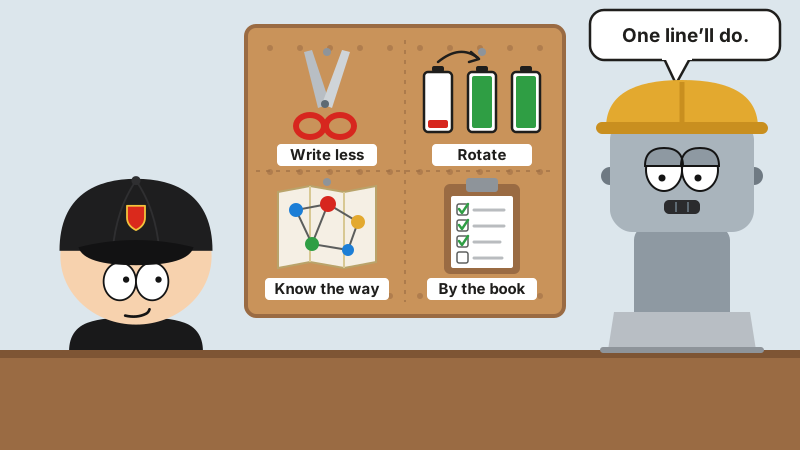
Four tools, one sentence: write less, rotate, know the way, go by the book.
Funny thing is, not one of the four is a new trick. They’re all habits old programmers pick up after years on the job: if you don’t have to write it, don’t; if this shop won’t do, go to the next one; learn your way around before you start; and work to a plan.
It took the old masters twenty years to get that lazy. AI gets there with one plugin.