Desk Included
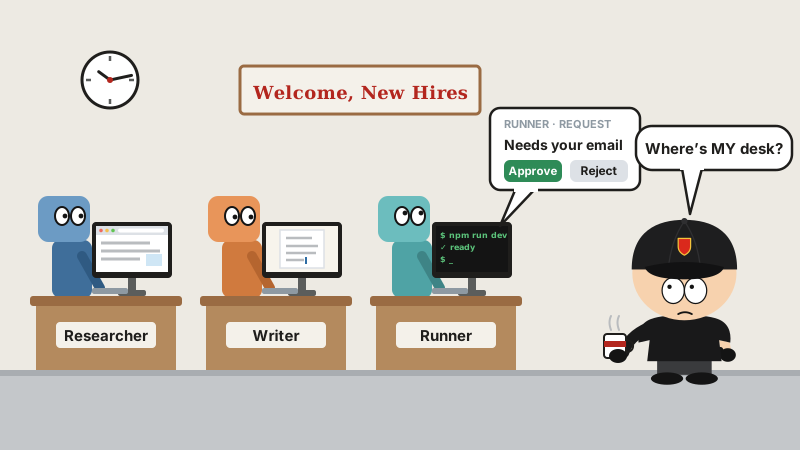
When a new hire shows up, the first order of business is a desk: the table, the computer, the accounts, the full set. No desk, and the poor guy just drifts up and down the hallway clutching a mug.
At the end of September, OpenAI put out something called Dots. AI coworkers, they say: always on, and every one of them comes with its own computer. The launch event was only a few minutes old when an open-source version popped up on GitHub.
The original: OpenAI’s Dots
OpenAI announced Dots on September 29 at DevDay, its developer conference in San Francisco. Each Dot gets its own cloud computer and browser, and hooks into more than 4,000 apps through plugins. You give it a goal and spell out which things it can handle on its own, and it keeps plugging away in the background; when it runs out of work, it goes off and does research on its own. You can reach it directly in Slack and Teams, and texting is supposedly coming soon.
The bar to get in is high: it’s only for ChatGPT Pro and Business Premium users, with the first Dot at no extra charge, and Pro users in the European Economic Area, Switzerland and the UK can’t use it yet. The same day, OpenAI also rolled out a new $500-a-month tier.
The first week wasn’t exactly smooth, either. According to reports from the room, the Dot being demoed on stage sat there doing nothing for ages, and the presenters had to cover for it, saying it wasn’t at its best this morning. On the forums, users said their Dots kept filing progress reports without ever finishing the job; people who tried sending one on errands got blocked several times by CAPTCHAs and login walls. OpenAI itself warns that Dots make mistakes, and that you should double-check anything important.
The open-source version: faster than takeout
The DevDay keynote started at 10 a.m. San Francisco time. CopilotKit’s OpenDots repo was created at 10:13, and according to the README, they had real-time conversation working that same day.
CopilotKit is an old hand at this. Its actual business is front-end dev tools for AI agents, and it has already put out open-source templates like OpenBot and OpenMuse, each name ringing a louder bell than the last.
As of now, OpenDots has over 6,400 stars and 900-plus forks. The code is MIT-licensed, written in TypeScript, and still in alpha. It’s upfront about it, too: this is a template, not a finished product. Clone it and bend it to your needs.
What OpenDots can do
- Build a squad: give each Dot a name, a role and a job description, and fence in which tools it may use. The researcher digs up material, the writer turns out drafts, and everybody minds their own business.
- A computer apiece: each Dot can have its own computer, running in a container. The browser, files and terminal are all its own, and they’re still there after a shutdown and restart. A computer panel shows you what it’s up to, and you can take over any time. And it doesn’t take up your desktop.
- The work lands on a page: output is saved as pages inside “Spaces”, with a visual editor, so you can pick it up and keep editing.
- Asks before it acts: before saving a page, it pops up a card, and you decide: “Approve and save” or “Reject”. For tools you’ve plugged in, the read-only ones run on their own; everything else waits for you to click “Approve and run”.
- Chats, calls, and shows up in Slack: besides text chat, it can do real-time voice calls, with another agent grinding through a long task in the background while you’re on the phone. @-mention it in Slack and it keeps answering in the thread.
- Works on a schedule: it can run in the background on a schedule. If a run dies halfway, it gets marked “Interrupted”, and you hit retry once you’ve looked it over.
Installing it takes Node.js 24:
git clone https://github.com/CopilotKit/OpenDots.git
cd OpenDots
npm ci
cp .env.example .env
npm run dev
Then open http://127.0.0.1:5173. If you actually want to talk to a Dot, you also have to hook up CopilotKit’s Intelligence service and fill in an OpenAI-compatible model key.
Two more by the same name
CopilotKit isn’t the only one with something called “OpenDots”.
- Anil-matcha’s: it used to be called open-dots and has since been renamed open-duet. Its description name-drops six products in one breath: Grok Bot, Claude Duet, OpenAI Dots, Meta Muse, Instinct, Manus Cue. Whoever’s hot, it’s the budget version of. The repo dates back to 2023, Apache 2.0 license, 6,700-plus stars. You can install a desktop app, run your own server, and there’s an Android app too; for models it can plug into Claude Code, Codex, Gemini CLI and Cursor, or local models through something like Ollama. Permissions come in four levels: ask me first, may edit files, approve on my behalf, and plan only. There’s also a hosted version at $15 to $99 a month.
- Shashankss1205’s: OpenDots, created October 1, 30-odd stars, MIT license. It runs in Python on Linux and revolves around a single goal you set: it watches for messages coming in from the terminal, HTTP, files and GitHub, does a “heartbeat” check on progress at set intervals, and runs any change past you for approval first. The author calls it a local prototype.
Fair warning
- The CopilotKit version isn’t fully self-hosted: conversations have to go through CopilotKit’s Intelligence service. Use the hosted version and your chats live in their cloud; use the local Docker version and you still have to log in to their account and be online to install and renew. Telemetry is on by default, and turning it off means setting
DO_NOT_TRACK=1yourself. Let’s be honest: it’s also a show home CopilotKit built for its own dev tools. - Still in alpha: by the README’s own account, things like Slack and handing tasks off from a voice call haven’t been fully verified on real services yet. It only supports one owner. Scheduled tasks are just repeating instructions, not a full goals-and-events system. Dots getting together for a meeting, or divvying up the work automatically: not built yet.
- The model’s on your dime: models are billed by usage, and the key is yours. A coworker who’s always on is also always burning tokens.
- Careful with real accounts: once you hook up Composio, a Dot can get into your email and calendar. The README suggests starting with read-only requests and trying write operations on a test account first.
- The original isn’t magic, either: OpenAI itself says Dots make mistakes. The open-source version runs on the same idea, so it probably hits most of the same potholes.
Last word
On AI coworkers, the original and the open-source version have the same idea: give it a computer of its own, let it keep working in the background, and have it check with you before it does anything for real. The difference: one bills you a monthly subscription, the other makes you set it up yourself and pay for the model out of your own pocket.
The keynote started at 10. CopilotKit’s repo was up by 10:13. The AI coworker hadn’t even clocked in yet, and the kid copying its homework had already handed his in.