The Crew’s All Here
Making a film used to mean rounding up a crew: a writer, a director, a camera operator, voice talent, an editor, a script supervisor, plus a producer to mind the money. Now that everyone’s a creator, one person is the whole crew. You cut footage deep into the night until your eyeballs go red.
There’s an open source project called OpenMontage that wants to hand that entire crew’s job to the code-writing AI already sitting on your computer.
What is it, anyway
OpenMontage, as in the film-editing montage. It went open source at the end of March this year and now has 76k stars (76,123 when I checked), over 10,000 forks and 76 contributors, and it has hit #1 on GitHub Trending’s daily chart. The code is AGPL-3.0, and the website is openmontage.video. The mascot is a clapperboard named Monty. At the end of the README, the author says the whole thing was pieced together after work and on weekends.
It isn’t editing software. It’s a “film crew” you install into your AI coding assistant, and it works with Claude Code, Cursor, Copilot, Windsurf and Codex. One line in the README nails it: there’s no orchestrator written in code; your AI coding assistant is the orchestrator.
Here’s what’s in the trunk: 12 production pipelines, 100+ tools, integrations with 60+ services, and 700+ skill and production-knowledge files.
12 pipelines
Animated explainers, motion graphics, AI-avatar presenters, cinematic trailers, long videos chopped into shorts, documentary montage, live footage mixed with AI visuals, translation and dubbing, podcasts turned into video, software demos, on-camera talking heads, plus cartoon character animation.
Every one of them runs the same process: research, proposal, script, storyboard, assets, edit, composite. Each step comes with a “director skill,” which is really just a Markdown instruction sheet teaching the AI how to do that step.
The jobs the README lists are down to earth, too: cut a video from your own on-camera footage; make an animated explainer from scratch; slice a 2-hour podcast into a dozen-plus short clips; translate and dub your content into 10 languages; stitch stock footage and AI-generated shots into a cinematic brand trailer.
Like a real crew
A few things make it feel like the real deal:
- Research before writing: before it touches the script, it searches the web 15 to 25+ times, combing YouTube, Reddit, Hacker News, news and academic sources, and turns it all into a research brief with citations. No winging it.
- Bring a reference: drop in a link to a video you like (YouTube, Reels, TikTok, whatever) and it breaks down the script, pacing, scenes, keyframes and style, then hands you two or three different takes, each with the tools it plans to use and what it’ll cost. You get a rough sample before the real shoot starts.
- No vendor loyalty: for voice, images, video and music, every service gets scored on 7 criteria: fit for the job 30%, quality 20%, controllability 15%, reliability 15%, cost 10%, speed 5%, consistency 5%. Who got picked, and why, goes in the log.
- Your nod at every gate: proposal, script, storyboard, generated assets, publishing. It stops at each one and waits for your call. The storyboard goes up on a local board called Backlot, where every scene’s frame, prompt, unit price and quality score hang on the wall. Rendering starts only after you’ve looked it over.
- Self-check after rendering: it runs ffprobe on the file and grabs frames at 4 points to look for black screens and broken overlays; checks the audio for silence and clipping; then checks the subtitles. Anything that fails never even reaches you.
- Allergic to the “wiggling slideshow”: there’s a “slideshow risk score” that rates things like repetitive visuals, pretty-but-pointless shots and weak motion. If a video that was supposed to be “mostly motion” turns out to be 80% still images, it gets stopped before compositing.
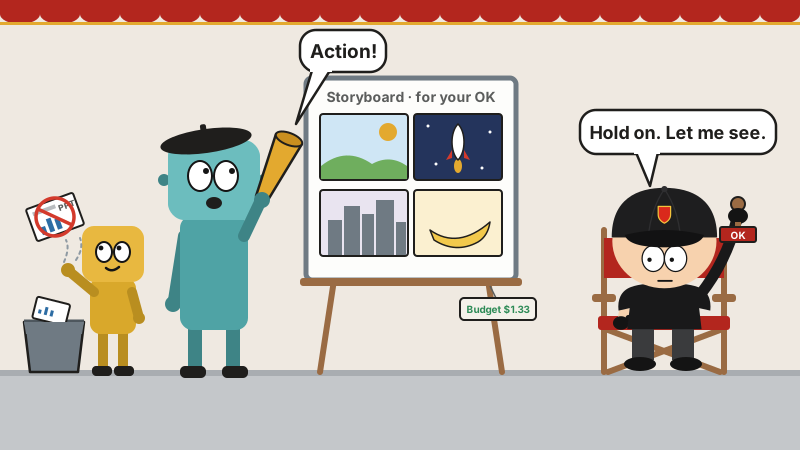
That’s the slideshow getting binned in the illustration up top.
Rolling on a zero budget
Without a single paid API key, here’s what you get once make setup finishes:
- Voice: Piper, local, offline text-to-speech.
- Footage: open footage from Archive.org, NASA and Wikimedia Commons; free stock from Pexels, Unsplash and Pixabay (those three want you to sign up for a free developer key).
- Compositing: Remotion, which renders animated scenes, data cards and word-by-word captions with React; HyperFrames, which does kinetic typography, product promos and SVG character animation with HTML and GSAP.
- Post: FFmpeg for encoding, burning in subtitles, mixing and color grading.
- Subtitles: built in, timed to the individual word.
It makes a point of saying this: a lot of “free AI video” is really a few still images nudged around and then called a video. OpenMontage’s documentary montage pipeline actually goes digging in open archives and stock libraries for moving footage, orders it by meaning, and cuts it into the timeline.
If you’ve got a graphics card, you can also run video models like WAN, Hunyuan, LTX-Video and CogVideo locally, also for free.
Want it prettier? Pay up
Hook up paid services and the options open wide: Kling, Veo, Runway, Seedance and MiniMax for video; ElevenLabs, OpenAI and Google for voice; Suno for music.
The sample videos in the README come with price tags. A 60-second Pixar-style animated short about a lonely banana who makes friends with a kiwi cost $1.33; a 50-second vertical short ran about $4.
$1.33 for one banana: steep at the grocery store, a steal for a film crew.
It minds the money too: it quotes a cost before work starts; you can set it to just keep a tab, warn you when you go over, or enforce a hard cap; any single charge over $0.50 needs your OK first, and the default total budget is $10.
Installing it
You need Python 3.10+, FFmpeg, Node.js 18+ (22+ if you want HyperFrames), and an AI coding assistant.
git clone https://github.com/calesthio/OpenMontage.git
cd OpenMontage
make setup
Then open the folder in Claude Code or a similar assistant and just say what you want, like “Make a 60-second animated explainer on how neural networks learn.” If you don’t want to spend money, ask for “a documentary montage, real footage only.” Want a taste first? make demo renders a few samples without any keys.
Fair warning
- It burns tokens: there’s no orchestrator written in code, so from research to editing, everything runs step by step through your AI assistant, and that’s a lot of model calls along the way. Its budget covers what the generation services charge. The tokens your AI assistant burns are a separate tab, and it’s yours.
- It’s hefty: Python, Node, FFmpeg, the whole stack, plus 700+ skill files. A lot heavier than an editing plugin.
- Free has its limits: on the free route, visuals come from open archives and stock libraries, or are still images turned into animation. For AI-generated cinematic shots, you need paid services or a good graphics card of your own.
- AGPL license: use it yourself however you like. But if you modify it and run it as an online service for other people, your modified code has to be open source too.
- Local LLMs aren’t here yet: running the whole pipeline on local models through Ollama or LM Studio is still listed as “coming soon” in the README. For now, the orchestration still leans on the big model behind your AI coding assistant.
Parting shots
The README also has a section written just for AI. The heading goes roughly: if you, an AI agent, are reading this, congratulations, you’ve probably passed the Turing test. Directors used to walk actors through their scenes. Now READMEs walk AIs through theirs.
The crew’s all here: research, writing, voiceover, editing, QC, all of it is the AI. There’s exactly one human left on set: you, in that chair, holding the stamp.
Before you stamp anything, take a peek at the token bill.